
As QR code solutions have become so widespread around the world, alongside legal and harmless QR codes, malicious and illegal QR codes serving threat actors have inevitably entered our daily lives. Unfortunately, unaware users often assume every QR code is safe and fall into the traps set by threat actors. Let’s start by first understanding how QR codes work.
QR codes function like a compact data map made up of small squares. A QR code essentially contains the following components:
-
Black and white (mostly) squares
Track Threat Intelligence like this every Monday.
Every Monday, the 5 threats SOC teams can't afford to miss — with analyst commentary.
-
Large squares at the corners
-
Alignment and timing patterns
-
Error correction data
QR codes store data in binary form. Black squares represent “1” and white squares represent “0.” Thanks to this structure, cameras can decode QR codes quickly and in a fault-tolerant manner.

How Do Devices Read QR Codes?
First, the phone camera detects the QR code. Then, using the corner squares, it calculates the size and orientation. The device reads the individual squares one by one, applies error correction algorithms to fill in missing or corrupted parts, and finally decodes the data and presents it to the user.
How Do Threat Actors Hunt Victims Using QR Codes?
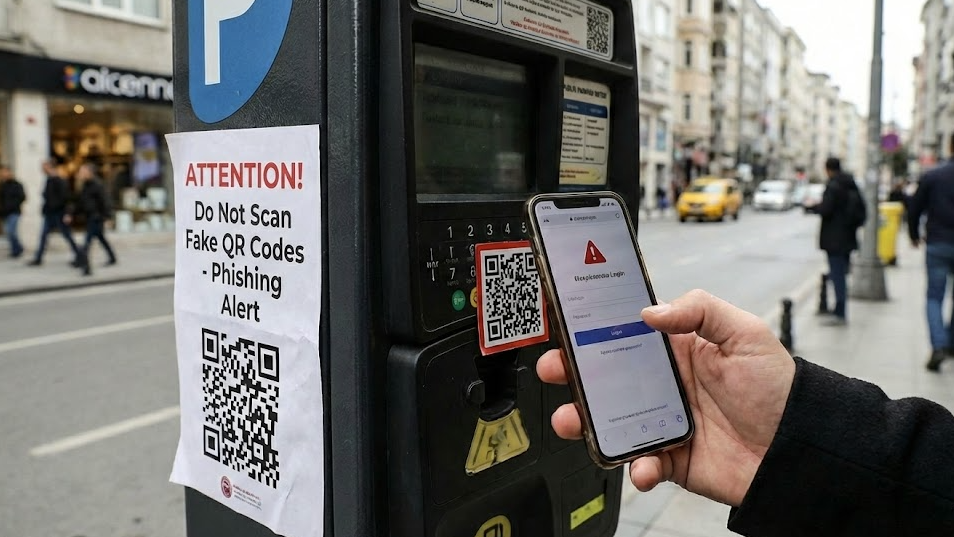
Threat actors target places we frequently encounter in daily life—such as restaurant menus, bank ATMs, advertising campaigns, or QR codes placed on poles—by removing the original QR codes or placing their own malicious QR codes on top of them, effectively luring victims.
How Do Threat Actors Use QR Codes?
Threat actors embed malicious data into QR codes to exploit victims. This malicious content may lead to phishing websites, fraud campaigns, or fake payment links.
Real-World Cases
Fake Payment QR Codes
In restaurants across China and Europe, attackers placed fake QR codes over original payment QR codes at payment points. Customers believed they were paying the restaurant, but in reality, the money was transferred directly to the threat actors. This method was especially common in self-service restaurants, where attackers successfully exploited unsuspecting victims.

QR Codes Containing Phishing Links
Threat actors replaced legitimate QR codes with fake ones containing URLs to phishing websites. Victims were redirected to completely fraudulent sites, commonly themed around delivery notifications, payments, banking, account verification, or password resets. In the United States, victims using Microsoft 365 were targeted with phishing emails containing malicious QR codes. Using persuasive messages such as “Security Update – Scan QR,” attackers convinced victims to scan the code, redirecting them to fake Microsoft login pages. In these attacks, authentication tokens were stolen, allowing attackers to bypass MFA protections.

Redirection to Malicious Websites via Fake QR Codes
In this method, attackers again targeted everyday locations such as restaurant menus. By replacing original QR codes with ones leading to malicious websites, victims were exploited without realizing it. For example, fake QR codes redirected users to counterfeit Google Play or App Store pages, tricking them into downloading trojans or malware-infected mobile applications. In some cases, browser-based exploits were used, or crypto-drainer websites were deployed.

Advanced Scenarios
Beyond basic phishing, QR codes can also be used for more advanced and targeted attacks.
QR → Device Fingerprinting
By directing victims to a malicious website through a fake QR code, threat actors can collect browser-accessible data such as IP address, language, operating system, and device information. This data can then be used to build highly personalized phishing scenarios.
QR → Crypto Draining
Through a malicious website accessed via a fake QR code, victims may be tricked into connecting their crypto wallets and granting necessary permissions. Once access is obtained, threat actors can drain all funds from the victim’s wallet.
QR → Corporate Access
QR codes placed by threat actors at office entrances or shared areas within office buildings can be used for internal phishing. This may result in the compromise of critical corporate information or unauthorized access to internal systems.
MITRE ATT&CK Mapping
| Attack Scenario | Tactic | Technique ID | Technique Name | Description |
|---|---|---|---|---|
| QR code leads to phishing website | Initial Access | T1566.002 | Phishing: Link | Victims are redirected via malicious QR codes to phishing websites impersonating legitimate services. |
| QR code used to deliver fake payment page | Initial Access | T1566.002 | Phishing: Link | Fake QR codes redirect users to fraudulent payment portals controlled by threat actors. |
| QR code redirects to malicious app store page | Initial Access | T1204.002 | User Execution: Malicious File | Victims are tricked into downloading and installing trojanized mobile applications. |
| Browser exploit or malicious script execution | Execution | T1059.007 | Command and Scripting Interpreter: JavaScript | Malicious JavaScript executes within the victim’s browser after QR redirection. |
| Device fingerprinting after QR scan | Discovery | T1082 | System Information Discovery | Threat actors collect OS, browser, language, and device details via QR-delivered websites. |
| Collection of IP and network data | Discovery | T1046 | Network Service Discovery | QR-based redirections allow attackers to identify victim network attributes. |
| Credential harvesting via fake login page | Credential Access | T1556.003 | Credentials from Web Browsers | Victims enter credentials into phishing pages accessed through QR codes. |
| MFA bypass via stolen session tokens | Credential Access | T1539 | Steal Web Session Cookie | Authentication tokens captured through QR phishing enable MFA bypass. |
| QR code leads to crypto wallet connection | Credential Access | T1528 | Steal Application Access Token | Victims unknowingly authorize malicious wallet interactions. |
| Wallet draining after approval | Impact | T1657 | Financial Theft | Threat actors drain cryptocurrency funds after obtaining wallet permissions. |
| QR phishing targeting corporate users | Initial Access | T1566.002 | Phishing: Link | QR codes placed in office environments are used for internal phishing attacks. |
| Access to internal corporate resources | Lateral Movement | T1021 | Remote Services | Compromised credentials enable access to internal systems and services. |
How to Mitigate the Risks
- QR codes in public areas should be designed in a way that makes tampering obvious, or protected with measures that prevent replacement. Users should always inspect the destination website of a QR code by analyzing the TLD, checking the domain, and treating shortened links with suspicion.
- Since QR codes bridge the physical and digital worlds, users do not see the link beforehand. Therefore, instead of automatically opening the link, presenting a URL preview after scanning a QR code is a critical security layer. Suspicious TLDs, lookalike domains, or link shorteners can often be identified at this stage.
- QR codes typically trigger the device’s default browser directly. In safer implementations, QR redirections can be opened within a sandboxed webview to limit malicious script execution, exploit attempts, or wallet interactions.
- In corporate environments, QR codes should be treated not only as digital assets but also as physical ones. In environments without a maintained QR code inventory, attackers can easily place fake stickers over existing codes and carry out phishing or fraud attacks.
- QR-based attacks can bypass email security controls and generate direct browser traffic. For this reason, monitoring QR-originated redirections in Secure Web Gateway and EDR solutions, analyzing redirect chains, and detecting phishing patterns are critically important.
- Ultimately, QR phishing (quishing) is a hybrid attack vector that combines physical and digital social engineering. As a result, effective defense strategies must address both physical and digital security layers.